
Dashboard
The VolleyTrack Dashboard provides a comprehensive and centralized view of all important metrics and information in your system. Track the performance of players, teams, and trainings in one place.
📊 Overview
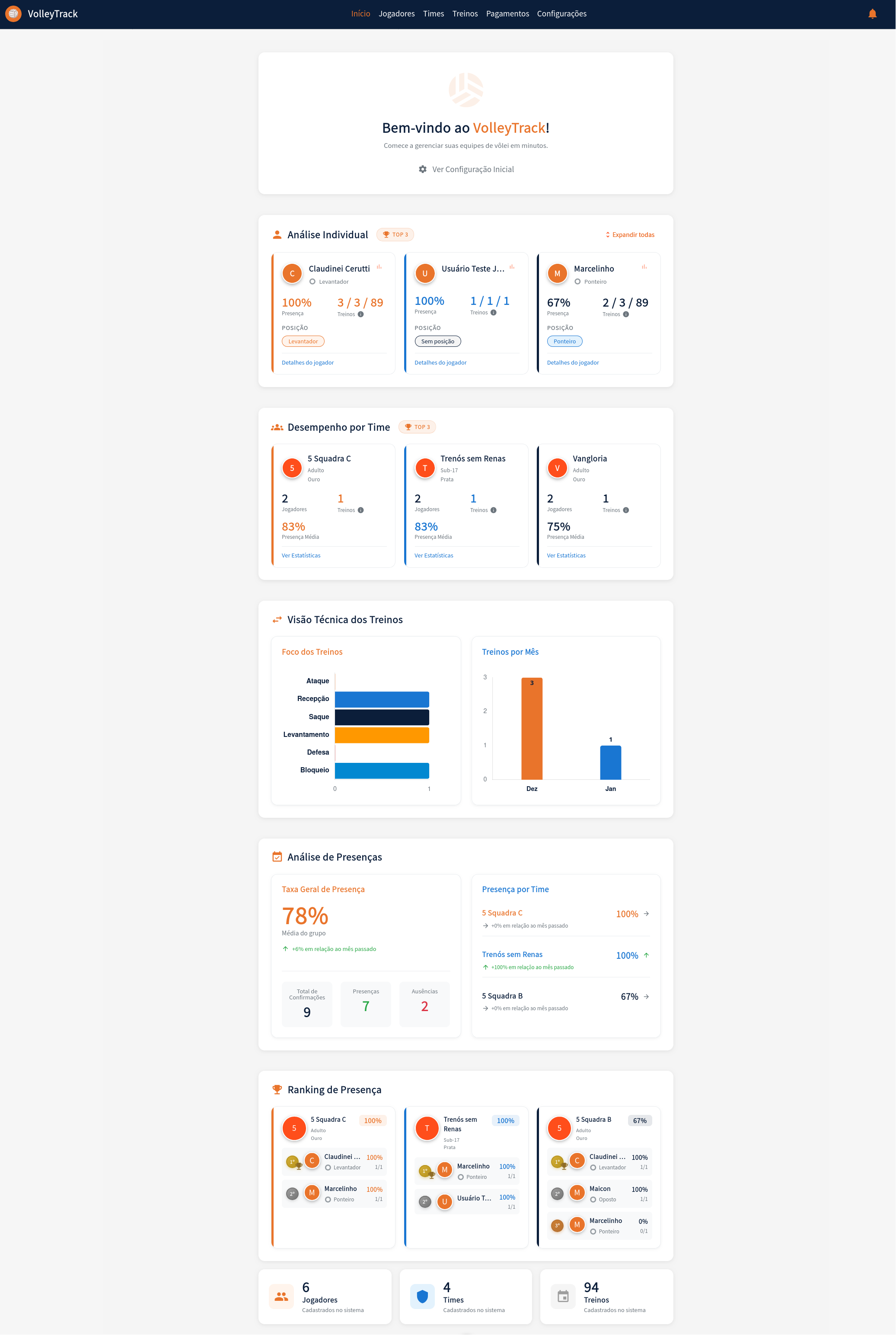
The Dashboard is the first screen you see when logging into the system. It presents consolidated information about players, teams, trainings, and attendance analyses.
👋 Welcome Section
At the top of the dashboard, you'll find:
- Welcome Message: "Welcome to VolleyTrack!"
- Subtitle: "Start managing your volleyball teams in minutes."
- Initial Configuration: Link to "View Initial Configuration" that helps you set up the system for the first time.
👤 Individual Analysis (TOP 3)
This section displays the three players with the best performance in the system.
Information Displayed
For each player, you'll see:
- Avatar: Colored circle with the player's initial
- Name: Player's full name
- Position: Player's position on the team (e.g., Setter, Outside Hitter, Opposite)
- Attendance Percentage: Percentage of attendance in trainings
- Training Statistics: Format "X/Y/Z Trainings" where:
- X: Number of presences
- Y: Total number of trainings
- Z: Another related indicator
- Position Badge: Badge showing the player's main position
- Link: "Player details" to view complete information
Features
- Expand all: Link in the top right corner to expand all player cards
- Player details: Click on any card to see detailed player information
👥 Team Performance (TOP 3)
This section shows the three teams with the best performance in the system.
Information Displayed
For each team, you'll see:
- Avatar: Colored circle with team number or initial
- Team Name: Team's full name
- Category: Team category and level (e.g., Adult, Gold / U-17, Silver)
- Number of Players: Number of players registered in the team
- Number of Trainings: Number of trainings conducted
- Average Attendance: Average attendance percentage of team players
- Link: "View Statistics" to view detailed team analyses
Features
- View Statistics: Click on any card to access complete team statistics
- Sorting: Teams are sorted by performance (average attendance)
📈 Technical Training View
This section presents visual analyses of conducted trainings.
Training Focus
Horizontal bar chart showing the distribution of fundamentals worked on in trainings:
- Attack: Number of trainings focused on attack
- Reception: Number of trainings focused on reception
- Serve: Number of trainings focused on serve
- Setting: Number of trainings focused on setting
- Defense: Number of trainings focused on defense
- Block: Number of trainings focused on block
Each bar visually shows the number of trainings for each fundamental, making it easy to identify the most worked-on areas.
Trainings per Month
Vertical bar chart showing the distribution of trainings throughout the months:
- Monthly visualization of the number of trainings conducted
- Facilitates tracking of training frequency
- Allows identification of periods of higher or lower activity
📊 Attendance Analysis
This section provides a detailed view of attendance and absences in trainings.
General Attendance Rate
Main card displaying:
- General Percentage: Large highlight for the general attendance rate (e.g., 78%)
- Subtitle: "Group average"
- Trend: Comparison with the previous month (e.g., "↑+6% compared to last month")
- Statistical Summary:
- Total Confirmations: Total number of confirmations received
- Presences: Total number of presences recorded
- Absences: Total number of absences recorded
Attendance by Team
List showing each team's attendance:
- Team Name: Team name
- Attendance Percentage: Team's attendance rate
- Trend Indicator:
- ↑: Increase compared to the previous month
- →: No change compared to the previous month
- ↓: Decrease compared to the previous month
🏆 Attendance Ranking
This section displays a detailed attendance ranking by team, showing each team's players sorted by performance.
Information Displayed
For each team in the ranking, you'll see:
- Team Avatar: Colored circle with team identifier
- Team Name: Team's full name
- Category: Team category and level
- Team Attendance Percentage: Team's overall attendance rate
- Player List: Players sorted by attendance:
- Ranking Position: 1st, 2nd, 3rd, etc.
- Player Name: Full or abbreviated name
- Position: Player's position on the team
- Attendance Percentage: Individual attendance rate
- Statistics: Format "X/Y" (presences/total trainings)
Features
- Sorting: Players sorted from highest to lowest attendance percentage
- View by Team: Each team is displayed in a separate card
- Comparison: Facilitates comparison of performance between teams and players
📋 Summary Cards
At the bottom of the dashboard, three cards provide a general system summary:
Players
- Total: Total number of players registered in the system
- Description: "Registered in the system"
Teams
- Total: Total number of teams registered in the system
- Description: "Registered in the system"
Trainings
- Total: Total number of trainings registered in the system
- Description: "Registered in the system"
💡 Usage Tips
- Daily Monitoring: Use the dashboard to quickly track the overall system status
- Trend Identification: Observe trend charts to identify attendance patterns
- Focus on Improvements: Use the attendance ranking to identify players or teams that need attention
- Fundamentals Analysis: The "Training Focus" section helps ensure all fundamentals are being worked on
- Quick Access: Click on "Details" and "View Statistics" links for deeper analyses